
In this section (22)
- Profections
- Zodiacal releasing
- Firdaria
- Decennials
- Circumambulation
- Primary directions
- Speculum
- Ascensional times
- Progressions
- Planetary hours
- Lunations
- Aspects
- Declination
- Midpoints
- Dignities and triplicity lords
- Lots
- Fixed stars
- Minor planets
- Chart family
- Elements and Quadruplicity
- Temperament
- Moon
Minor planets
The Minor planets card places the asteroids, centaurs and other bodies you work with in the chart, and has a catalogue to add more from, so you can keep a working set and read its contacts.
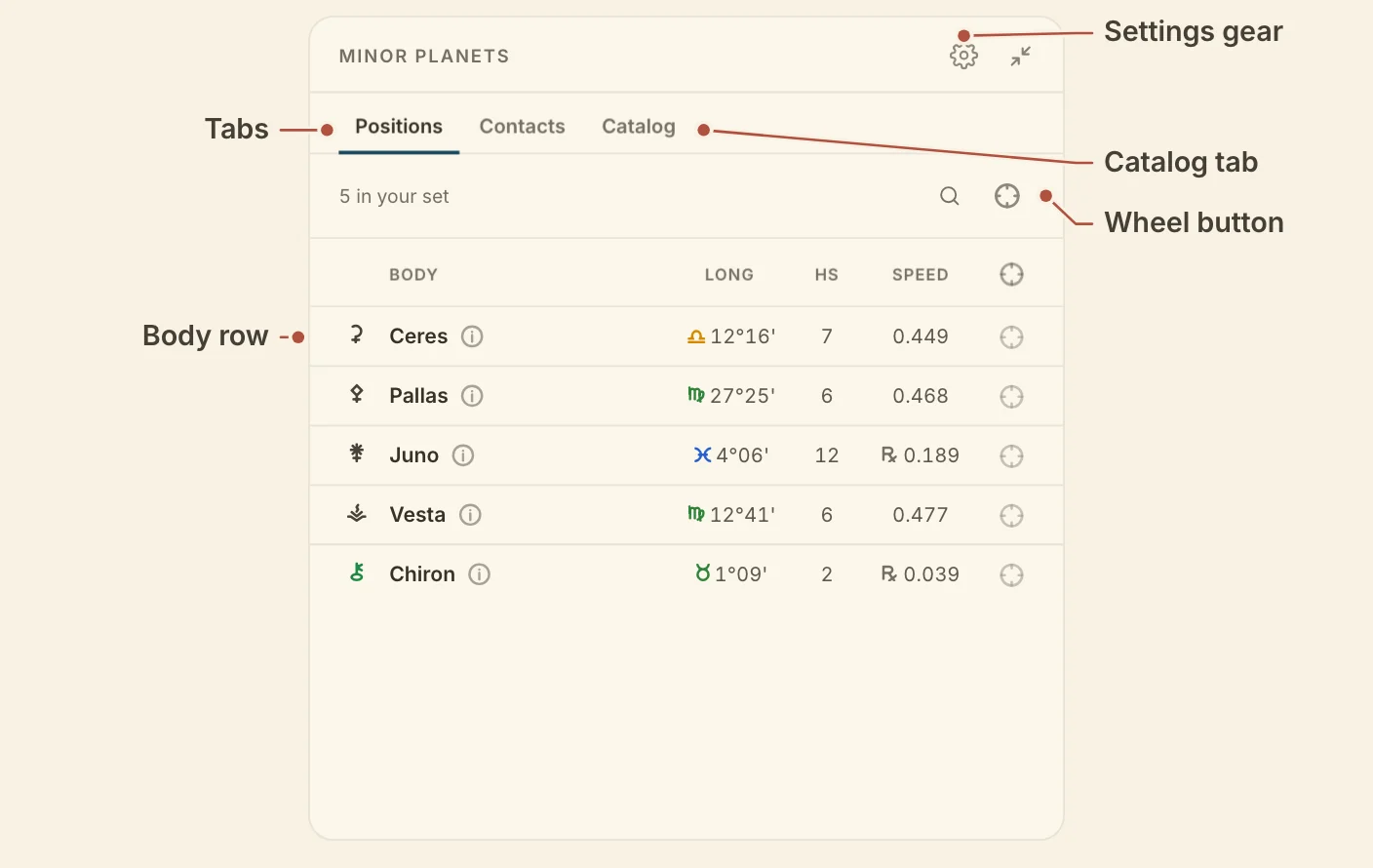
Reading the Minor planets card
The Minor planets card has three tabs, Positions (the default) and Contacts for reading your working set in the chart, and Catalog for building it. Each keeps its own columns and its own sort.
Positions lists your working set. It starts with Ceres, Pallas, Juno, Vesta and Chiron.
Contacts groups the bodies by the chart point they aspect. The Aspects menu chooses which aspects count, the conjunction by default.
The search button opens a field. Search by name, number or theme. Each row has a wheel button that draws the body on the wheel, and the wheel button on the bar shows every body in the list.
Click a row on any tab to open the body's profile. Identity gives its number and family. In this chart gives its longitude, house, daily motion and latitude. Add to Positions and Show on wheel sit at the foot. The (i) beside a body's name opens it in the Resource catalogue.
The gear holds the card's two settings. Columns picks up to four columns for the tab you are on, and Contacts orb is 1° by default. Whether the bodies are named on the wheel is set under minor planets in Settings.
The minor planet catalogue
Catalog, the third tab on the Minor planets card, is where you build your working set. The Catalogue scope menu narrows the list.
- All bodies is the whole catalogue.
- Your sets, saved in Settings, Points or from this menu.
- Families, Ceres-class, Centaurs, Damocloids, Trans-Neptunians and Main belt.
- Traditions and Themes, the published rosters.
The + on a row adds the body to Positions, and − takes it out again. In All bodies, a search also finds named minor planets beyond the catalogue and lists them under Elsewhere in the catalogue. Save as set…, at the foot of the scope menu, saves the bodies now on the wheel under a name.
Didn't answer it? Write to support@arcusastrology.com.