
In this section (22)
- Profections
- Zodiacal releasing
- Firdaria
- Decennials
- Circumambulation
- Primary directions
- Speculum
- Ascensional times
- Progressions
- Planetary hours
- Lunations
- Aspects
- Declination
- Midpoints
- Dignities and triplicity lords
- Lots
- Fixed stars
- Minor planets
- Chart family
- Elements and Quadruplicity
- Temperament
- Moon
Midpoints
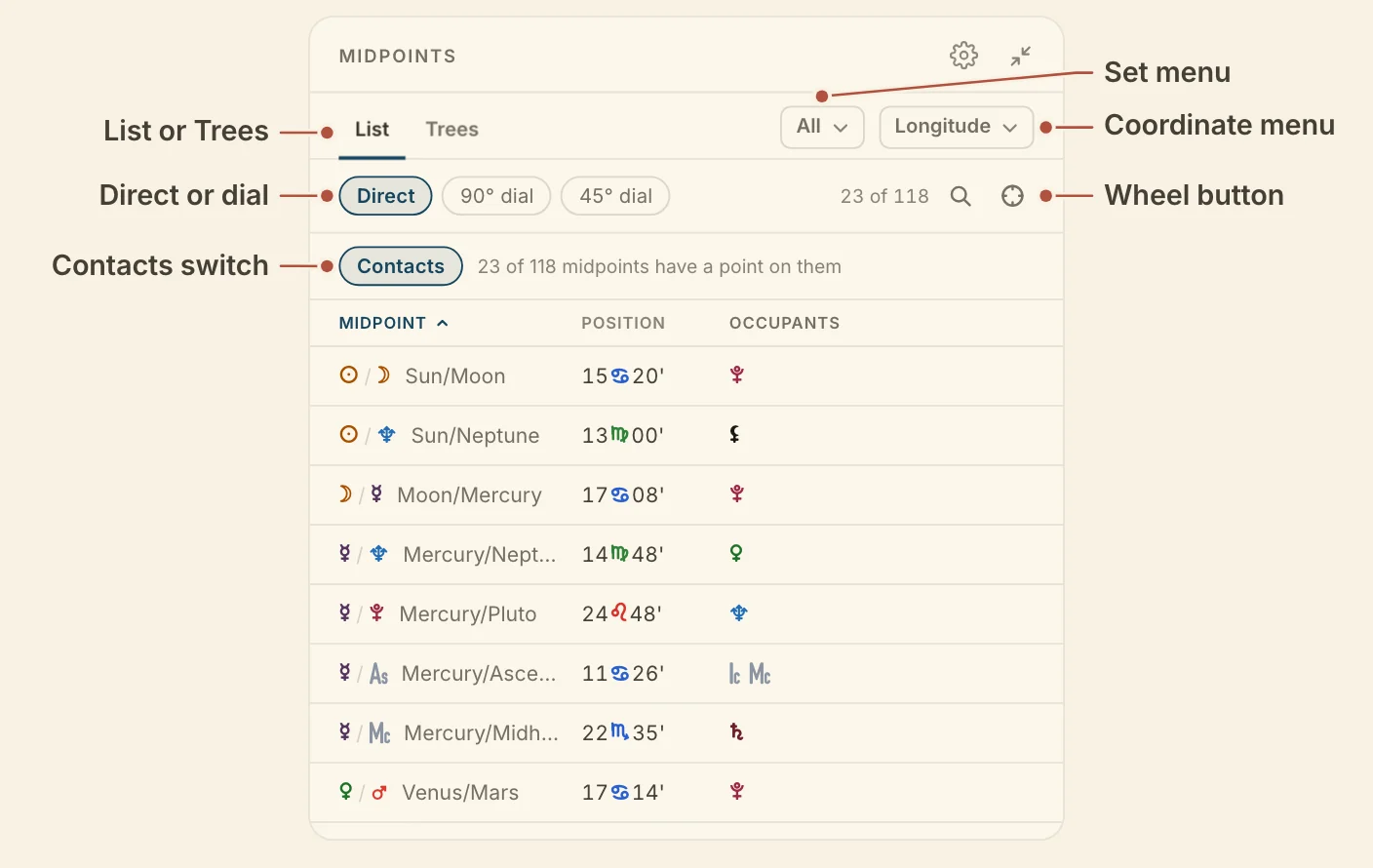
The Midpoints card lists every midpoint in the chart with what stands on it, and reads them on a direct line or a dial, so you can find the occupied midpoints and draw them on the wheel.
Reading the Midpoints card
The Midpoints card shows its midpoints in two tabs, List (the default), which goes midpoint by midpoint, and Trees, which goes point by point.
List shows each midpoint, its position, its occupants with their orbs. Contacts, under the bar, is on by default and keeps only the midpoints with a point on them. Turn it off to see every midpoint. Click the Midpoint heading to sort in planetary order, and the position heading to sort in zodiacal order.
Trees gives one block per point, with every midpoint it stands on. Click a point's heading to read only that point. Show all brings the rest back.
The search button opens a field. Type a pair, such as Moon/Mars.
In Longitude, each row has a wheel button that draws that midpoint on the wheel. The wheel button on the bar shows every midpoint in the list, or takes them all off.
The card has one setting, its orb, behind the gear. It is how close a point has to stand to count as on a midpoint, 1.5° by default. The midpoints are made from the points the wheel is drawing, which you change in Settings.
Choosing midpoints, coordinates and dials
Two menus and a row of buttons at the top of the Midpoints card decide what it reads and how it lays it out. The first menu chooses which midpoints the card reads, All midpoints, your own sets, or the presets Sun/Moon and Lights and angles. In Longitude the menu ends with Save as set…, which saves the midpoints on the wheel under a name. Your sets can be renamed or deleted in the same menu.
The second menu chooses the coordinate, Longitude (the default), Latitude, Right ascension, Declination or Azimuth. Azimuth needs a birth place.
Direct, 90° dial and 45° dial sit on the bar. Direct is the default. In Latitude and Declination the bar holds Parallel or contraparallel.
Didn't answer it? Write to support@arcusastrology.com.